---
title: Employee Hub
description: teams, employees, hub, information,
---
[Skip to content](https://knowledge.sweptworks.com/knowledge/employee-hub#main-content)
English
Show submenu for translations
![Swept Logo.png\]](https://knowledge.sweptworks.com/hs-fs/hubfs/Swept%20Logo.png?height=50&name=Swept%20Logo.png)
- [Home](https://www.sweptworks.com/)
- [About Us](https://sweptworks.com/about)
- [Default HubSpot Blog](https://cleansimple-1682788.hs-sites.com/blog)
Open main navigation
Close main navigation
- [Home](https://www.sweptworks.com/)
- [About Us](https://sweptworks.com/about)
- [Default HubSpot Blog](https://cleansimple-1682788.hs-sites.com/blog)
- English
Show submenu for translations
- [Go to login](https://app.sweptworks.com/)
[Go to login](https://app.sweptworks.com/)
How can we help?
- There are no suggestions because the search field is empty.
1. [Swept Support Center](https://knowledge.sweptworks.com/knowledge?hsLang=en)
2. [Getting Started](https://knowledge.sweptworks.com/knowledge/getting-started?hsLang=en)
3. [Teams](https://knowledge.sweptworks.com/knowledge/getting-started?hsLang=en#teams)
# Employee Hub
### What is the Employee Hub?
The Employee Hub gives your team one place to manage employee details from day one and is already included in your **Scale** plan for full access.
### **How do I access it?**
To open it, go to **Team**, select an employee, and open their profile.
The first tab is the **Contact Information** tab. This tab will look familiar, and includes all of the contact information for the employee.
Fields include:
Role, Employee ID, First name, Last name, Email address, Phone number, Address, Country, Timezone, Language, Security PIN (when needed), IVR PIN (when needed)
/Employee%20Hub%20Visuals/Screenshot%202026-06-17%20at%201.08.43%20PM.png?width=343&height=352&name=Screenshot%202026-06-17%20at%201.08.43%20PM.png)
The second tab is the **Employment Information** tab. This includes any job-related information.
Fields include:
Employee type (Full time, Part time, or Contract), Reports to (Manager Name), Hire date, Hourly pay scale, Toggle to disable mandatory geofence clock in/out, Toggle to track travel time, Location assignments
/Employee%20Hub%20Visuals/Screenshot%202026-06-17%20at%201.05.42%20PM.png?width=335&height=356&name=Screenshot%202026-06-17%20at%201.05.42%20PM.png)
The third tab is **Availability**. Use this tab to manage the available hours an employee can work.
/Employee%20Hub%20Visuals/Screenshot%202026-06-17%20at%201.05.52%20PM.png?width=342&height=359&name=Screenshot%202026-06-17%20at%201.05.52%20PM.png)
The fourth tab is for **Notes**. Use this tab to add internal notes related to the employee. Notes give admins and managers a place to keep helpful employee context inside Swept.
/Employee%20Hub%20Visuals/Screenshot%202026-06-17%20at%201.06.41%20PM.png?width=355&height=437&name=Screenshot%202026-06-17%20at%201.06.41%20PM.png)
The final tab is for any **documents** you wish to attach. This could include contracts, certifications, and more. **Only admins have access to this tab.**
#### /Employee%20Hub%20Visuals/Screenshot%202026-06-17%20at%201.07.01%20PM.png?width=410&height=475&name=Screenshot%202026-06-17%20at%201.07.01%20PM.png) **Employee Hub on Mobile**
The Employee Hub is also available on the Mobile App. To ensure that Hub is available to you, ensure that your mobile app is updated to at least **version 6.8.0**.
**How to view and edit employee profile information on mobile**
1. Open the Swept mobile app.
2. Tap **More** in the navigation panel at the bottom of the screen.
3. Select **Cleaners**.
4. To view a cleaner’s availability, tap the cleaner’s name.
***Note:** Availability is view-only on mobile. To edit an employee’s availability, log in to the Swept web app.*
5. To edit an employee’s information, tap the **three dots** beside the employee’s name.
6. Tap **Edit**.
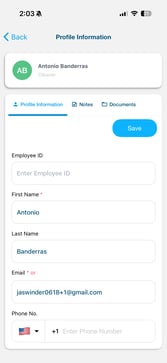
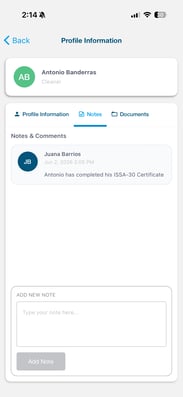
You will now see three tabs: **Profile Information**, **Notes**, and **Documents**.
1. **Profile Information -** The **Profile Information** tab includes the employee’s core profile details. This contains the same fields and information as before.
2. **Notes -** The **Notes** tab is where admins and managers can add internal notes related to the employee. Use this tab to keep helpful employee details in Swept, such as training updates, reminders, or other important information managers may need to know.
3. **Documents-** The **Documents** tab is where employee-related files can be stored and viewed.

**Note:** **Launch** plans will still have access to all previous features such as employee information and contact information. Notes and Availability functions will be available to **Optimize** plans, and all of the new features of the Employee Hub are available to **Scale** and **Loyalty** customers.
- [What's New in Swept?](https://knowledge.sweptworks.com/knowledge/whats-new-in-swept?hsLang=en)
- [Getting Started](https://knowledge.sweptworks.com/knowledge/getting-started?hsLang=en#main-content)
- [Swept Overview](https://knowledge.sweptworks.com/knowledge/getting-started?hsLang=en#swept-overview)
- [Settings & Configuration](https://knowledge.sweptworks.com/knowledge/getting-started?hsLang=en#settings-configuration)
- [Locations](https://knowledge.sweptworks.com/knowledge/getting-started?hsLang=en#locations)
- [Teams](https://knowledge.sweptworks.com/knowledge/getting-started?hsLang=en#teams)
- [Understanding Reports](https://knowledge.sweptworks.com/knowledge/getting-started?hsLang=en#understanding-reports)
- [Alerts](https://knowledge.sweptworks.com/knowledge/getting-started?hsLang=en#alerts)
- [Scheduling](https://knowledge.sweptworks.com/knowledge/scheduling?hsLang=en#main-content)
- [Scheduling Overview](https://knowledge.sweptworks.com/knowledge/scheduling?hsLang=en#scheduling-overview)
- [Setup and Manage Checklists](https://knowledge.sweptworks.com/knowledge/scheduling?hsLang=en#setup-and-manage-checklists)
- [Time Tracking](https://knowledge.sweptworks.com/knowledge/time-tracking?hsLang=en)
- [Inspections](https://knowledge.sweptworks.com/knowledge/inspections?hsLang=en)
- [Supplies](https://knowledge.sweptworks.com/knowledge/supplies?hsLang=en)
- [Clients](https://knowledge.sweptworks.com/knowledge/clients?hsLang=en#main-content)
- [Setup Clients in Swept](https://knowledge.sweptworks.com/knowledge/clients?hsLang=en#setup-clients-in-swept)
- [Client's View](https://knowledge.sweptworks.com/knowledge/clients?hsLang=en#clients-view)
- [Swept Mobile App](https://knowledge.sweptworks.com/knowledge/swept-mobile-app?hsLang=en#main-content)
- [Mobile Overview](https://knowledge.sweptworks.com/knowledge/swept-mobile-app?hsLang=en#mobile-overview)
- [Communication with Messaging](https://knowledge.sweptworks.com/knowledge/swept-mobile-app?hsLang=en#communication-with-messaging)
- [Resources](https://knowledge.sweptworks.com/knowledge/resources?hsLang=en#main-content)
- [Troubleshooting](https://knowledge.sweptworks.com/knowledge/resources?hsLang=en#troubleshooting)
- [Onboarding](https://knowledge.sweptworks.com/knowledge/resources?hsLang=en#onboarding)
- [Video Library](https://knowledge.sweptworks.com/knowledge/video-library?hsLang=en)
- [Support Center](https://knowledge.sweptworks.com/knowledge/support-center?hsLang=en)
- [Manage your Operations](https://knowledge.sweptworks.com/knowledge/manage-your-operations?hsLang=en#main-content)
- [Daily Pulse](https://knowledge.sweptworks.com/knowledge/manage-your-operations?hsLang=en#daily-pulse)
- [Home](https://www.sweptworks.com/)
- [About Us](https://sweptworks.com/about)
- [Default HubSpot Blog](https://cleansimple-1682788.hs-sites.com/blog)
[](https://www.sweptworks.com/?hsLang=en)
Take Control, Trust Swept
Copyright © 2026, Swept
