---
title: Late Arrivals and No Show Alerts
description: Alerts for late shifts and no shows
---
[Skip to content](https://knowledge.sweptworks.com/knowledge/late-arrivals-and-no-show-alerts#main-content)
English
Show submenu for translations
![Swept Logo.png\]](https://knowledge.sweptworks.com/hs-fs/hubfs/Swept%20Logo.png?height=50&name=Swept%20Logo.png)
- [Home](https://www.sweptworks.com/)
- [About Us](https://sweptworks.com/about)
- [Default HubSpot Blog](https://cleansimple-1682788.hs-sites.com/blog)
Open main navigation
Close main navigation
- [Home](https://www.sweptworks.com/)
- [About Us](https://sweptworks.com/about)
- [Default HubSpot Blog](https://cleansimple-1682788.hs-sites.com/blog)
- English
Show submenu for translations
- [Go to login](https://app.sweptworks.com/)
[Go to login](https://app.sweptworks.com/)
How can we help?
- There are no suggestions because the search field is empty.
1. [Swept Support Center](https://knowledge.sweptworks.com/knowledge?hsLang=en)
2. [Getting Started](https://knowledge.sweptworks.com/knowledge/getting-started?hsLang=en)
3. [Settings & Configuration](https://knowledge.sweptworks.com/knowledge/getting-started?hsLang=en#settings-configuration)
# Late Arrivals and No Show Alerts
### **Overview**
Swept can monitor both "Late Arrivals" and "No Shows" to shifts via the alerts.
1. **Late Shift / Late Arrival alerts**
- This alert notifies Supervisors and Managers of a cleaner clocking in late for a shift.
- Users can adjust the alert timing to allow for flexibility
- Users will also be able to fully turn this alert on or off.
2. **No Show alerts** *(New as of May 2026)*
- This feature notifies the right users (admins, managers, and supervisors) when a cleaner has not clocked in for a scheduled shift within the configured time window.
- No Show alerts will be **default ON** for users, but users can turn them off if they do not want to receive them.
### **Enabling Alerts on a User Level**
Admins and Managers can edit or disable their own alerts. Both the Late Arrivals and No Show alerts are enabled by default.
***Note:** In some Loyalty plan accounts, selected Supervisors may also be able to view and manage these settings depending on their user access.*
**To edit your alerts on the web app:**
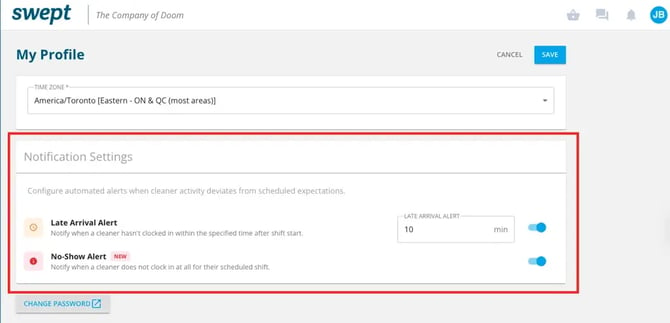
1. Click on your initials in the top right corner.
2. Select "**My Profile**".
3. Under the "Notification Settings" section, you can edit or disable alerts.
**To edit your alerts on the mobile app:**
Admins, Managers, and Supervisors will be able to manage their alert settings from the Swept mobile app.
1. Tap **More**.
2. Tap **Notifications**.
3. Turn **Late Arrival Alerts** or **No Show Alerts** on or off.
4. Adjust the timing for **Late Arrival Alerts**, if needed.
| /Notifications.png?width=300&height=652&name=Notifications.png) | /Screenshot%202026-05-27%20at%2011.05.39%20AM.png?width=300&height=652&name=Screenshot%202026-05-27%20at%2011.05.39%20AM.png) |
| --- | --- |
### **Enabling Alerts by Location**
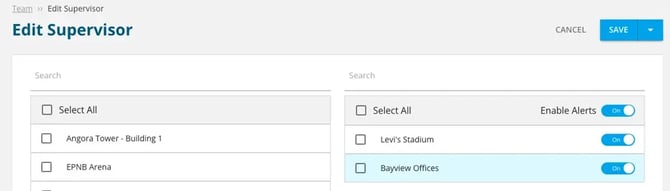
Alerts can also be enabled or disable for a user via the Team section for specific locations. This feature enables/disables alerts for Administrators, Managers, or Supervisors.
1\. Select the "Team" section on the left.
2\. Find the user you wish to edit.
3\. At the bottom of the user, each location that the user is assigned has an "Enable Alerts" slider.
- [What's New in Swept?](https://knowledge.sweptworks.com/knowledge/whats-new-in-swept?hsLang=en)
- [Getting Started](https://knowledge.sweptworks.com/knowledge/getting-started?hsLang=en#main-content)
- [Swept Overview](https://knowledge.sweptworks.com/knowledge/getting-started?hsLang=en#swept-overview)
- [Settings & Configuration](https://knowledge.sweptworks.com/knowledge/getting-started?hsLang=en#settings-configuration)
- [Locations](https://knowledge.sweptworks.com/knowledge/getting-started?hsLang=en#locations)
- [Teams](https://knowledge.sweptworks.com/knowledge/getting-started?hsLang=en#teams)
- [Understanding Reports](https://knowledge.sweptworks.com/knowledge/getting-started?hsLang=en#understanding-reports)
- [Alerts](https://knowledge.sweptworks.com/knowledge/getting-started?hsLang=en#alerts)
- [Scheduling](https://knowledge.sweptworks.com/knowledge/scheduling?hsLang=en#main-content)
- [Scheduling Overview](https://knowledge.sweptworks.com/knowledge/scheduling?hsLang=en#scheduling-overview)
- [Setup and Manage Checklists](https://knowledge.sweptworks.com/knowledge/scheduling?hsLang=en#setup-and-manage-checklists)
- [Time Tracking](https://knowledge.sweptworks.com/knowledge/time-tracking?hsLang=en)
- [Inspections](https://knowledge.sweptworks.com/knowledge/inspections?hsLang=en)
- [Supplies](https://knowledge.sweptworks.com/knowledge/supplies?hsLang=en)
- [Clients](https://knowledge.sweptworks.com/knowledge/clients?hsLang=en#main-content)
- [Setup Clients in Swept](https://knowledge.sweptworks.com/knowledge/clients?hsLang=en#setup-clients-in-swept)
- [Client's View](https://knowledge.sweptworks.com/knowledge/clients?hsLang=en#clients-view)
- [Swept Mobile App](https://knowledge.sweptworks.com/knowledge/swept-mobile-app?hsLang=en#main-content)
- [Mobile Overview](https://knowledge.sweptworks.com/knowledge/swept-mobile-app?hsLang=en#mobile-overview)
- [Communication with Messaging](https://knowledge.sweptworks.com/knowledge/swept-mobile-app?hsLang=en#communication-with-messaging)
- [Resources](https://knowledge.sweptworks.com/knowledge/resources?hsLang=en#main-content)
- [Troubleshooting](https://knowledge.sweptworks.com/knowledge/resources?hsLang=en#troubleshooting)
- [Onboarding](https://knowledge.sweptworks.com/knowledge/resources?hsLang=en#onboarding)
- [Video Library](https://knowledge.sweptworks.com/knowledge/video-library?hsLang=en)
- [Support Center](https://knowledge.sweptworks.com/knowledge/support-center?hsLang=en)
- [Manage your Operations](https://knowledge.sweptworks.com/knowledge/manage-your-operations?hsLang=en#main-content)
- [Daily Pulse](https://knowledge.sweptworks.com/knowledge/manage-your-operations?hsLang=en#daily-pulse)
- [Home](https://www.sweptworks.com/)
- [About Us](https://sweptworks.com/about)
- [Default HubSpot Blog](https://cleansimple-1682788.hs-sites.com/blog)
[](https://www.sweptworks.com/?hsLang=en)
Take Control, Trust Swept
Copyright © 2026, Swept
