---
title: How to set a GeoFence at a Location
description: Learn how to use the geofence feature around a Location to ensure Cleaners and Supervisors are Clocking In/Out from the correct place.
---
[Skip to content](https://knowledge.sweptworks.com/knowledge/setup-geofence#main-content)
English
Show submenu for translations
![Swept Logo.png\]](https://knowledge.sweptworks.com/hs-fs/hubfs/Swept%20Logo.png?height=50&name=Swept%20Logo.png)
- [Home](https://www.sweptworks.com/)
- [About Us](https://sweptworks.com/about)
- [Default HubSpot Blog](https://cleansimple-1682788.hs-sites.com/blog)
Open main navigation
Close main navigation
- [Home](https://www.sweptworks.com/)
- [About Us](https://sweptworks.com/about)
- [Default HubSpot Blog](https://cleansimple-1682788.hs-sites.com/blog)
- English
Show submenu for translations
- [Go to login](https://app.sweptworks.com/)
[Go to login](https://app.sweptworks.com/)
How can we help?
- There are no suggestions because the search field is empty.
1. [Swept Support Center](https://knowledge.sweptworks.com/knowledge?hsLang=en)
2. [Getting Started](https://knowledge.sweptworks.com/knowledge/getting-started?hsLang=en)
3. [Locations](https://knowledge.sweptworks.com/knowledge/getting-started?hsLang=en#locations)
# How to set a GeoFence at a Location
## Learn how to use the geofence feature around a Location to ensure Cleaners and Supervisors are Clocking In/Out from the correct place.
### What is a GeoFence?
A GeoFence is a digital fence you draw around a location to establish the acceptable area for Clocking In/Out from.
**Which package supports GeoFence functionality?**
**Launch**: not supported. Please visit our [compare plans page](https://sweptworks.com/compare-plans?hsLang=en) to upgrade.
**Optimize**: supported and available for Managers and Admins to set the boundary.
**Scale**: supported and available for Managers and Admins to set the boundary.
**Loyalty customers prior to August 1, 2024**: Geofences can be set by Managers and Supervisors with “Enable Management” permission.
### How is it used?
You have the option to only allow staff to clock in from within an acceptable GeoFence by making the GeoFence Mandatory or Non-Mandatory.
- **Non-Mandatory -** A user is allowed to Clock In/Out outside of the drawn fence managers.
- **Mandatory -** Users are unable to Clock in/out outside of the drawn fence. There can be exceptions made for specific users. [**Read more about this here.**](https://knowledge.sweptworks.com/knowledge/gps-settings-for-cleaners-clock-in/out?hsLang=en)
#### **How is it set up?**
To set up a GeoFence:
- Choose the location you want to set up, or create a new location.
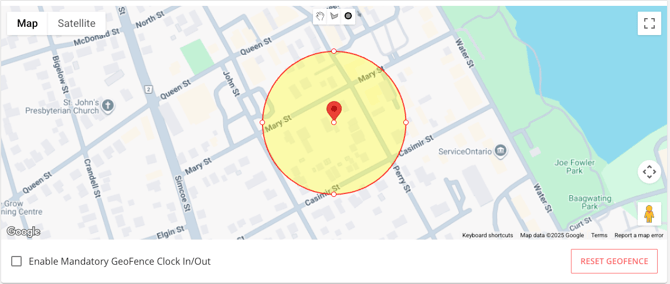
- Once an address is entered, you will be able to see it on the map with a centered radius (This works only for Google Verified addresses).
- By default, you can change the radius of the GeoFence by selecting a dot on the side of the circle and dragging it toward or away from the center.
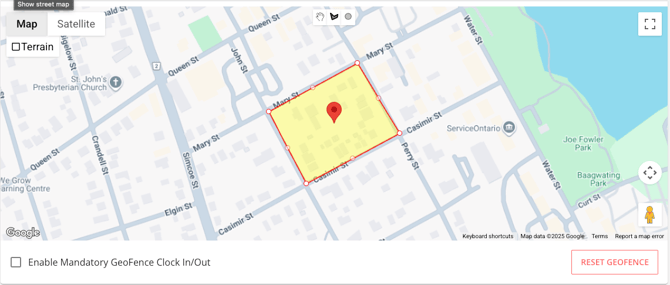
- You can select the custom shape option at the top of the map to draw a custom GeoFence, or you can select the circle to choose a new center point of your GeoFence circle.
⚠️ **If an employee forgets to clock out within a Mandatory GeoFence, they'll have to return to the site or ask their Manager/Supervisor to manually clock them out using Swept's time entry report.**
#### **How can I turn off Mandatory GeoFence for a specific user?**
- Access the [Web app](https://app.sweptworks.com/).
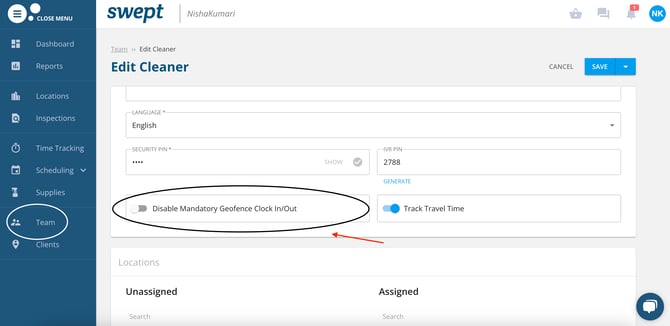
- Click On **Cleaner/Supervisor** and select the **edit pencil Icon** to enter the profile details.
- Scroll down the page to see the option **Disable Mandatory GeoFence Clock In/Out**. Select the radio button, which will turn blue.
- Click **Save at the bottom of the page.**
This way the cleaner can Clock In/Out from the location whether the Location Services is enabled or not.
If you have any questions, contact our technical support team in our chat or email us at [support@sweptworks.com](mailto:support@sweptworks.com).
- [What's New in Swept?](https://knowledge.sweptworks.com/knowledge/whats-new-in-swept?hsLang=en)
- [Getting Started](https://knowledge.sweptworks.com/knowledge/getting-started?hsLang=en#main-content)
- [Swept Overview](https://knowledge.sweptworks.com/knowledge/getting-started?hsLang=en#swept-overview)
- [Settings & Configuration](https://knowledge.sweptworks.com/knowledge/getting-started?hsLang=en#settings-configuration)
- [Locations](https://knowledge.sweptworks.com/knowledge/getting-started?hsLang=en#locations)
- [Teams](https://knowledge.sweptworks.com/knowledge/getting-started?hsLang=en#teams)
- [Understanding Reports](https://knowledge.sweptworks.com/knowledge/getting-started?hsLang=en#understanding-reports)
- [Alerts](https://knowledge.sweptworks.com/knowledge/getting-started?hsLang=en#alerts)
- [Scheduling](https://knowledge.sweptworks.com/knowledge/scheduling?hsLang=en#main-content)
- [Scheduling Overview](https://knowledge.sweptworks.com/knowledge/scheduling?hsLang=en#scheduling-overview)
- [Setup and Manage Checklists](https://knowledge.sweptworks.com/knowledge/scheduling?hsLang=en#setup-and-manage-checklists)
- [Time Tracking](https://knowledge.sweptworks.com/knowledge/time-tracking?hsLang=en)
- [Inspections](https://knowledge.sweptworks.com/knowledge/inspections?hsLang=en)
- [Supplies](https://knowledge.sweptworks.com/knowledge/supplies?hsLang=en)
- [Clients](https://knowledge.sweptworks.com/knowledge/clients?hsLang=en#main-content)
- [Setup Clients in Swept](https://knowledge.sweptworks.com/knowledge/clients?hsLang=en#setup-clients-in-swept)
- [Client's View](https://knowledge.sweptworks.com/knowledge/clients?hsLang=en#clients-view)
- [Swept Mobile App](https://knowledge.sweptworks.com/knowledge/swept-mobile-app?hsLang=en#main-content)
- [Mobile Overview](https://knowledge.sweptworks.com/knowledge/swept-mobile-app?hsLang=en#mobile-overview)
- [Communication with Messaging](https://knowledge.sweptworks.com/knowledge/swept-mobile-app?hsLang=en#communication-with-messaging)
- [Resources](https://knowledge.sweptworks.com/knowledge/resources?hsLang=en#main-content)
- [Troubleshooting](https://knowledge.sweptworks.com/knowledge/resources?hsLang=en#troubleshooting)
- [Onboarding](https://knowledge.sweptworks.com/knowledge/resources?hsLang=en#onboarding)
- [Video Library](https://knowledge.sweptworks.com/knowledge/video-library?hsLang=en)
- [Support Center](https://knowledge.sweptworks.com/knowledge/support-center?hsLang=en)
- [Manage your Operations](https://knowledge.sweptworks.com/knowledge/manage-your-operations?hsLang=en#main-content)
- [Daily Pulse](https://knowledge.sweptworks.com/knowledge/manage-your-operations?hsLang=en#daily-pulse)
- [Home](https://www.sweptworks.com/)
- [About Us](https://sweptworks.com/about)
- [Default HubSpot Blog](https://cleansimple-1682788.hs-sites.com/blog)
[](https://www.sweptworks.com/?hsLang=en)
Take Control, Trust Swept
Copyright © 2026, Swept

```json
{
"@context" : "https://schema.org",
"@type" : "VideoObject",
"contentUrl" : "https://1682788.fs1.hubspotusercontent-na1.net/hubfs/1682788/2024%20Files%20(Sorted)/2024%20Product%20Assets/2024-%20Product%20Images%20and%20Videos/Geo-fence%20walkthrough.mov",
"dateModified" : "2025-07-30T14:22:45.272Z",
"duration" : "PT2M29.333S",
"height" : 1080,
"name" : "Geo-fence walkthrough",
"thumbnailUrl" : "https://1682788.fs1.hubspotusercontent-na1.net/hubfs/1682788/2024%20Files%20(Sorted)/2024%20Product%20Assets/2024-%20Product%20Images%20and%20Videos/Geo-fence%20walkthrough.mov/medium.jpg",
"uploadDate" : "2024-10-21T16:51:19.952Z",
"width" : 2160
}
```