---
title: "Swept Updates: 2026"
description: Updates, 2026, feature
---
[Skip to content](https://knowledge.sweptworks.com/knowledge/swept-updates-2026#main-content)
English
Show submenu for translations
![Swept Logo.png\]](https://knowledge.sweptworks.com/hs-fs/hubfs/Swept%20Logo.png?height=50&name=Swept%20Logo.png)
- [Home](https://www.sweptworks.com/)
- [About Us](https://sweptworks.com/about)
- [Default HubSpot Blog](https://cleansimple-1682788.hs-sites.com/blog)
Open main navigation
Close main navigation
- [Home](https://www.sweptworks.com/)
- [About Us](https://sweptworks.com/about)
- [Default HubSpot Blog](https://cleansimple-1682788.hs-sites.com/blog)
- English
Show submenu for translations
- [Go to login](https://app.sweptworks.com/)
[Go to login](https://app.sweptworks.com/)
How can we help?
- There are no suggestions because the search field is empty.
1. [Swept Support Center](https://knowledge.sweptworks.com/knowledge?hsLang=en)
2. [What's New in Swept?](https://knowledge.sweptworks.com/knowledge/whats-new-in-swept?hsLang=en)
# Swept Updates: 2026
## The latest updates in the Swept web and mobile app.
📲 Remind your team to keep the **Swept Mobile App up to date** so they can use the latest features and get a smoother experience.
### **September 2026**
**Swept Web App: Payroll Report Page Upgrade**
**/New%20Payroll%20Report%20Page%20(3).png?width=670&height=377&name=New%20Payroll%20Report%20Page%20(3).png)**
The Payroll Reporting experience has been upgraded for admins and managers across all plans. With clearer filters, Warnings Only, and Variance filtering, teams can spot what needs attention sooner while keeping the same review, approval, and download workflow they already know.
Learn more **[here.](https://knowledge.sweptworks.com/knowledge/download-payroll-report?hsLang=en)**
---
### **August 2026**
**Swept Mobile App: Cleaner Time Off Requests**
**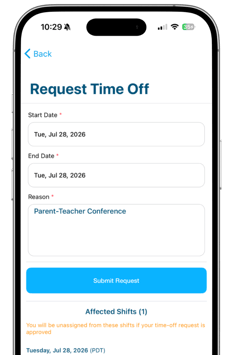**
Cleaners can now submit and cancel time off requests directly in the Swept mobile app, keeping requests out of scattered texts and giving managers more time to plan coverage.
Managers can review each request, see which shifts are affected, and quickly reassign approved shifts to keep client work covered.
Time Off Requests are included with the Scale plan.
**[Learn how Time Off Requests work.](https://knowledge.sweptworks.com/knowledge/time-off-requests?hsLang=en)**
---
### **July 2026**
**Swept Web App: Flexible Pay Per Shift**
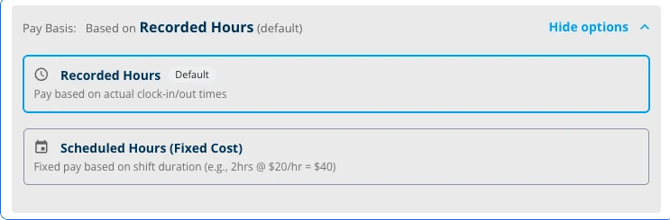
Users on all plans can now choose between a shift being paid on a "Recorded Hours" basis, or on a "Scheduled Hours" basis.
Learn more about scheduling shifts **[here](https://knowledge.sweptworks.com/knowledge/create-and-manage-shifts?hsLang=en).**
---
**Swept Web App: QuickBooks Online Payroll Integration**
**/QuickBooks/quickbooks%20interface.png?width=463&height=290&name=quickbooks%20interface.png)
For Scale and Loyalty Customers:** Approved time can now move from Swept to QuickBooks with fewer manual steps. QuickBooks Integration helps make payroll prep faster, cleaner, and easier to hand off.
**[Learn how to connect Swept payroll to QuickBooks Online](https://knowledge.sweptworks.com/knowledge/how-do-i-sync-my-account-with-quickbooks?hsLang=en)**
---
### **June 2026**
**Daily Pulse is here for admins**
**.png?width=476&height=268&name=Daily%20Pulse%20(3).png)**
Daily Pulse helps admins start the day with a clearer view of yesterday’s operations, so they can spot missed shifts, supply needs, quality activity, and labor variance without digging through reports first.
Learn more about **[Daily Pulse](https://knowledge.sweptworks.com/knowledge/daily-pulse?hsLang=en)**
---
**Swept Web and Mobile App: Employee Hub**
**/Employee%20Hub%20Visuals/Employee%20Hub%20-%20LP%20visual.gif?width=508&height=286&name=Employee%20Hub%20-%20LP%20visual.gif)Employee Hub is now available in Swept Web and Mobile app.** See employee details, availability, notes, and documents in one place, so your team can make faster decisions and stay organized as your operation grows.
Read more **[here.](https://knowledge.sweptworks.com/knowledge/employee-hub?hsLang=en)**
---
### **May 2026**
**Swept Web and Mobile App: Late Arrivals and No-Show Alerts**
**/Late%20Arrivals%20and%20No%20Shows.gif?width=408&height=230&name=Late%20Arrivals%20and%20No%20Shows.gif)**
Late Arrival and No Show Alerts help your team spot attendance gaps sooner, so you can follow up faster and keep every location on track.
Read more [**here**](https://knowledge.sweptworks.com/knowledge/late-arrivals-and-no-show-alerts?hsLang=en)
---
**Swept Web App: Schedule Calendar**
**/Schedule%20Calendar.png?width=489&height=275&name=Schedule%20Calendar.png)**
The Schedule Calendar tool has been updated with a refreshed interface, new colour coding, and helpful icons that make it easier to view and manage your schedule.
Watch the video [**here**](https://knowledge.sweptworks.com/knowledge/new-schedule-calendar-view-may-15-2026?hsLang=en)
---
### **April 2026**
**Swept Mobile App: Checklist Images**
**/Checklist%20Images%20(6).png?width=516&height=290&name=Checklist%20Images%20(6).png)**
Cleaners and supervisors can submit photos on individual checklist tasks to provide visual proof of completed work. Admins and managers can review these images in the Checklist Result Report to better verify task completion and support quality control.
Check this **[article](https://knowledge.sweptworks.com/knowledge/swept-checklist-scheduling?hsLang=en)** to teach cleaners how to complete checklists.
---
**Swept Mobile App: Checklist Translations**
**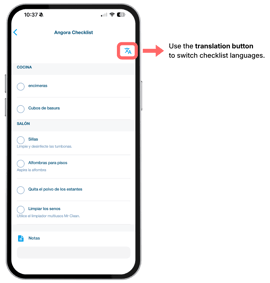**
Checklist tasks can be translated to **100+ languages** to help multilingual teams follow instructions more clearly on-site. Translations will happen automatically based on device and setting language, or translated via a "Translate" button at the top of the device screen.
Learn more about completing checklists **[here](https://knowledge.sweptworks.com/knowledge/swept-checklist-scheduling?hsLang=en)**
---
**Swept Web App: Editing Employee Information**
Say goodbye to support tickets for simple employee information changes. Our updated workflow lets admins and managers update an employee's contact info instantly in the web app. Once changes are made, the employee is notified. **If an employee works for multiple companies, their profile remains secure, so only the employee can make changes.**
Learn more **[here](https://knowledge.sweptworks.com/knowledge/how-to-add-a-team-member?hsLang=en)**
---
### **March 2026**
**Swept Web and Mobile App: Add clients directly to your channels**
| /Custom%20Channels%20with%20Clients.png?width=374&height=210&name=Custom%20Channels%20with%20Clients.png) | /Custom%20Channels%20Mobile.png?width=120&height=192&name=Custom%20Channels%20Mobile.png) |
| --- | --- |
Admins can now create new custom channels with clients or add them to existing ones — bringing your clients and team into one conversation.
Learn how to create channels [**here.**](https://knowledge.sweptworks.com/knowledge/custom-channels?hsLang=en)
---
### **February 2026**
##### **Swept Web App: Announcements**
**/Announcements%20(Zoomed)png.png?width=243&height=242&name=Announcements%20(Zoomed)png.png)**
Announcements lets Admins and Managers send one message to everyone at once for important updates. It reaches employees right away, and you can see who has read it, so you can follow up if needed. Supervisors and Cleaners can view announcements and react with emojis, but they cannot create or send them.
Learn how to send announcements **[here.](https://knowledge.sweptworks.com/knowledge/how-to-send-an-announcement?hsLang=en)**
##### **Swept Mobile App: Supply images**
**/Supplies.png?width=246&height=300&name=Supplies.png)**
Cleaners can now view supply images when requesting supplies in the Swept mobile app. This makes it easier to recognize the right item at a glance, submit requests faster, and reduce back-and-forth with supervisors and managers.
Learn how to request supplies **[here](https://knowledge.sweptworks.com/knowledge/requesting-supplies-in-swept?hsLang=en).**
Read about it **[here](https://knowledge.sweptworks.com/knowledge/requesting-supplies-in-swept?hsLang=en).**
---
### **January 2026**
##### **Swept Web App: Add Images to Supplies**
##### **/Supply%20Images%20(Web).png?width=345&height=194&name=Supply%20Images%20(Web).png)** Admins and Managers can now add an image to any supply item so your team can recognize it instantly and submit more accurate supply requests with fewer follow-ups.
Watch the video [**here.**](https://knowledge.sweptworks.com/knowledge/how-to-add-supply-images?hsLang=en)
Read about it **[here](https://knowledge.sweptworks.com/knowledge/manage-suppliers-and-supplies?hsLang=en).**
- [What's New in Swept?](https://knowledge.sweptworks.com/knowledge/whats-new-in-swept?hsLang=en)
- [Getting Started](https://knowledge.sweptworks.com/knowledge/getting-started?hsLang=en#main-content)
- [Swept Overview](https://knowledge.sweptworks.com/knowledge/getting-started?hsLang=en#swept-overview)
- [Settings & Configuration](https://knowledge.sweptworks.com/knowledge/getting-started?hsLang=en#settings-configuration)
- [Locations](https://knowledge.sweptworks.com/knowledge/getting-started?hsLang=en#locations)
- [Teams](https://knowledge.sweptworks.com/knowledge/getting-started?hsLang=en#teams)
- [Understanding Reports](https://knowledge.sweptworks.com/knowledge/getting-started?hsLang=en#understanding-reports)
- [Alerts](https://knowledge.sweptworks.com/knowledge/getting-started?hsLang=en#alerts)
- [Scheduling](https://knowledge.sweptworks.com/knowledge/scheduling?hsLang=en#main-content)
- [Scheduling Overview](https://knowledge.sweptworks.com/knowledge/scheduling?hsLang=en#scheduling-overview)
- [Setup and Manage Checklists](https://knowledge.sweptworks.com/knowledge/scheduling?hsLang=en#setup-and-manage-checklists)
- [Time Tracking](https://knowledge.sweptworks.com/knowledge/time-tracking?hsLang=en)
- [Inspections](https://knowledge.sweptworks.com/knowledge/inspections?hsLang=en)
- [Supplies](https://knowledge.sweptworks.com/knowledge/supplies?hsLang=en)
- [Clients](https://knowledge.sweptworks.com/knowledge/clients?hsLang=en#main-content)
- [Setup Clients in Swept](https://knowledge.sweptworks.com/knowledge/clients?hsLang=en#setup-clients-in-swept)
- [Client's View](https://knowledge.sweptworks.com/knowledge/clients?hsLang=en#clients-view)
- [Swept Mobile App](https://knowledge.sweptworks.com/knowledge/swept-mobile-app?hsLang=en#main-content)
- [Mobile Overview](https://knowledge.sweptworks.com/knowledge/swept-mobile-app?hsLang=en#mobile-overview)
- [Communication with Messaging](https://knowledge.sweptworks.com/knowledge/swept-mobile-app?hsLang=en#communication-with-messaging)
- [Resources](https://knowledge.sweptworks.com/knowledge/resources?hsLang=en#main-content)
- [Troubleshooting](https://knowledge.sweptworks.com/knowledge/resources?hsLang=en#troubleshooting)
- [Onboarding](https://knowledge.sweptworks.com/knowledge/resources?hsLang=en#onboarding)
- [Video Library](https://knowledge.sweptworks.com/knowledge/video-library?hsLang=en)
- [Support Center](https://knowledge.sweptworks.com/knowledge/support-center?hsLang=en)
- [Manage your Operations](https://knowledge.sweptworks.com/knowledge/manage-your-operations?hsLang=en#main-content)
- [Daily Pulse](https://knowledge.sweptworks.com/knowledge/manage-your-operations?hsLang=en#daily-pulse)
- [Home](https://www.sweptworks.com/)
- [About Us](https://sweptworks.com/about)
- [Default HubSpot Blog](https://cleansimple-1682788.hs-sites.com/blog)
[](https://www.sweptworks.com/?hsLang=en)
Take Control, Trust Swept
Copyright © 2026, Swept
