---
title: Time Entry Summary by Cleaner Report
description: Learn how to review time entry summary by cleaner report in Swept
---
[Skip to content](https://knowledge.sweptworks.com/knowledge/time-entry-summary-by-cleaner-report#main-content)
English
Show submenu for translations
![Swept Logo.png\]](https://knowledge.sweptworks.com/hs-fs/hubfs/Swept%20Logo.png?height=50&name=Swept%20Logo.png)
- [Home](https://www.sweptworks.com/)
- [About Us](https://sweptworks.com/about)
- [Default HubSpot Blog](https://cleansimple-1682788.hs-sites.com/blog)
Open main navigation
Close main navigation
- [Home](https://www.sweptworks.com/)
- [About Us](https://sweptworks.com/about)
- [Default HubSpot Blog](https://cleansimple-1682788.hs-sites.com/blog)
- English
Show submenu for translations
- [Go to login](https://app.sweptworks.com/)
[Go to login](https://app.sweptworks.com/)
How can we help?
- There are no suggestions because the search field is empty.
1. [Swept Support Center](https://knowledge.sweptworks.com/knowledge?hsLang=en)
2. [Getting Started](https://knowledge.sweptworks.com/knowledge/getting-started?hsLang=en)
3. [Understanding Reports](https://knowledge.sweptworks.com/knowledge/getting-started?hsLang=en#understanding-reports)
# Time Entry Summary by Cleaner Report
## Learn how to review time entry summary by cleaner report in Swept
Keep track of how much time your cleaners are logging. The Time Entry Summary by Cleaner Report totals the hours each cleaner has worked. The configurable timeframe filter allows managers to keep track of how much time each of their cleaners is logging.
### Who Has Access to This Report?
Only managers and supervisors with access to the [Swept Web App](https://app.sweptworks.com/) and Reports can view the Time Entry Summary by Cleaner Report.
#### Instructions
- Log in to the [Swept Web App.](https://app.sweptworks.com/)
- In the left-hand menu, navigate to the **Reports** section and then select the **Time Entry Summary by Cleaner** option.
- Your report will show like below:
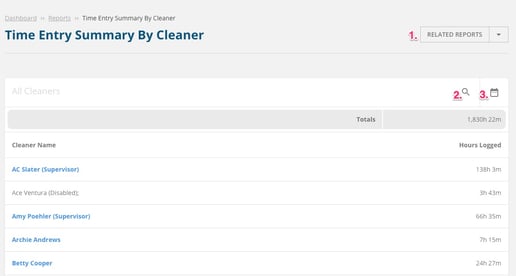
1. Click on **Related Reports** to go to the **Time Entry Report**.
2. In the **All Cleaners** search field type in the name of a specific cleaner whose hours you would like to see.
3. Choose to view the hours of your cleaners in a specific timeframe by clicking the calendar icon.
- Below the filters will see the **Cleaner Name** and **Hours Logged.**
- Click on a line of a specific Cleaner to be taken to the time entry report that is filtered by their name so you can view an extended view of their hours.
To learn more about the Time Entry Report, [click here.](https://knowledge.sweptworks.com/knowledge/time-entry-report?hsLang=en)
We're just getting started on simplifying Swept and putting the power into your hands to save you time and keep "sweeping" up your competitors.
If you have questions, please reach out to [support@swept.com](mailto:support@swept.com) or ask a question in our chatbot.
- [What's New in Swept?](https://knowledge.sweptworks.com/knowledge/whats-new-in-swept?hsLang=en)
- [Getting Started](https://knowledge.sweptworks.com/knowledge/getting-started?hsLang=en#main-content)
- [Swept Overview](https://knowledge.sweptworks.com/knowledge/getting-started?hsLang=en#swept-overview)
- [Settings & Configuration](https://knowledge.sweptworks.com/knowledge/getting-started?hsLang=en#settings-configuration)
- [Locations](https://knowledge.sweptworks.com/knowledge/getting-started?hsLang=en#locations)
- [Teams](https://knowledge.sweptworks.com/knowledge/getting-started?hsLang=en#teams)
- [Understanding Reports](https://knowledge.sweptworks.com/knowledge/getting-started?hsLang=en#understanding-reports)
- [Alerts](https://knowledge.sweptworks.com/knowledge/getting-started?hsLang=en#alerts)
- [Scheduling](https://knowledge.sweptworks.com/knowledge/scheduling?hsLang=en#main-content)
- [Scheduling Overview](https://knowledge.sweptworks.com/knowledge/scheduling?hsLang=en#scheduling-overview)
- [Setup and Manage Checklists](https://knowledge.sweptworks.com/knowledge/scheduling?hsLang=en#setup-and-manage-checklists)
- [Time Tracking](https://knowledge.sweptworks.com/knowledge/time-tracking?hsLang=en)
- [Inspections](https://knowledge.sweptworks.com/knowledge/inspections?hsLang=en)
- [Supplies](https://knowledge.sweptworks.com/knowledge/supplies?hsLang=en)
- [Clients](https://knowledge.sweptworks.com/knowledge/clients?hsLang=en#main-content)
- [Setup Clients in Swept](https://knowledge.sweptworks.com/knowledge/clients?hsLang=en#setup-clients-in-swept)
- [Client's View](https://knowledge.sweptworks.com/knowledge/clients?hsLang=en#clients-view)
- [Swept Mobile App](https://knowledge.sweptworks.com/knowledge/swept-mobile-app?hsLang=en#main-content)
- [Mobile Overview](https://knowledge.sweptworks.com/knowledge/swept-mobile-app?hsLang=en#mobile-overview)
- [Communication with Messaging](https://knowledge.sweptworks.com/knowledge/swept-mobile-app?hsLang=en#communication-with-messaging)
- [Resources](https://knowledge.sweptworks.com/knowledge/resources?hsLang=en#main-content)
- [Troubleshooting](https://knowledge.sweptworks.com/knowledge/resources?hsLang=en#troubleshooting)
- [Onboarding](https://knowledge.sweptworks.com/knowledge/resources?hsLang=en#onboarding)
- [Video Library](https://knowledge.sweptworks.com/knowledge/video-library?hsLang=en)
- [Support Center](https://knowledge.sweptworks.com/knowledge/support-center?hsLang=en)
- [Manage your Operations](https://knowledge.sweptworks.com/knowledge/manage-your-operations?hsLang=en#main-content)
- [Daily Pulse](https://knowledge.sweptworks.com/knowledge/manage-your-operations?hsLang=en#daily-pulse)
- [Home](https://www.sweptworks.com/)
- [About Us](https://sweptworks.com/about)
- [Default HubSpot Blog](https://cleansimple-1682788.hs-sites.com/blog)
[](https://www.sweptworks.com/?hsLang=en)
Take Control, Trust Swept
Copyright © 2026, Swept
