![Swept Logo.png]](https://knowledge.sweptworks.com/hs-fs/hubfs/Swept%20Logo.png?height=50&name=Swept%20Logo.png)
Time-off planning often happens through texts, calls, or side conversations that are disconnected from the schedule. This feature brings the request, approval, and resulting schedule change into Swept.
For admins and managers, that means earlier visibility into employee availability and a clearer path to keeping shifts covered.
The Time Off Request feature is ONLY available in the Scale and Loyalty plans. To upgrade your plan, click here.
For Cleaners: How to Submit Time Off Request (English)
For Cleaners: How to Submit Time Off Request (Spanish)
For Cleaners: How to request time off in the Mobile App
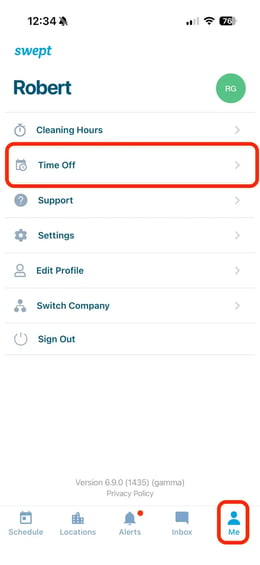
1. Go to the "Me" section in the mobile app. From here, you'll now see a "Time off" section
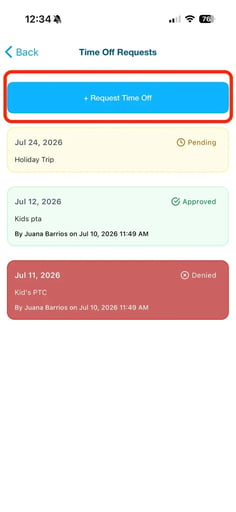
2. On this tab, you'll see all previous time-off requests. To create a new request, select the "+ Request Time Off" button.
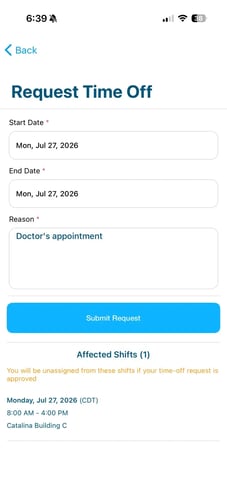
3. Add the start and end dates, and the reason for the request. Note: be sure to review any shifts that may be affected.
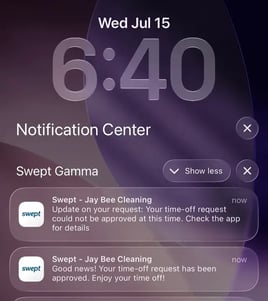
4. You will then receive a notification once the request is either approved or denied.
5. To cancel a pending, approved, or denied request, select the request from the Time Off page and tap “Cancel.” Once cancelled, you will be available for shift assignment again.
⚠️ Please note that you will not automatically be reassigned to any shifts you were previously removed from.
/Time%20Off%20Request%20Mobile%20(1).png?width=670&height=377&name=Time%20Off%20Request%20Mobile%20(1).png)
A Few Important Notes:
- You cannot request time off for the current day.
- The earliest available request date is the following day.
- Requests can cover one day or a range of dates.
- A reason is required.
- Before submitting, you can see which scheduled shifts would be affected if the request is approved.
- You will receive an alert or push notification when the request is approved or denied.
For Admins and Managers: How to Review, Approve, or Deny a Request
1. Go to “Scheduling” and select the “Pending Time Off Requests” Card at the top of the screen.
/Time%20Off%20-%20Manager%20view.png?width=626&height=322&name=Time%20Off%20-%20Manager%20view.png)
2. Select the request and review the following details: Employee name, Requested dates, Reason, Any affected shifts.
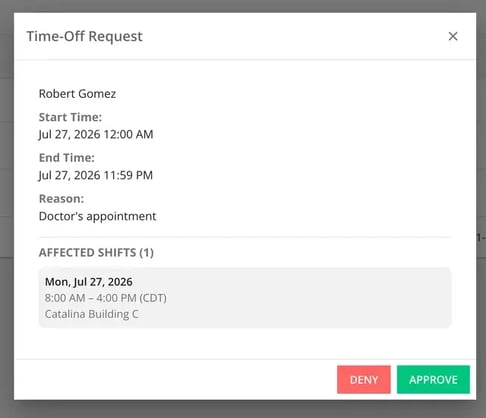
3. Select either Approve or Deny.
If you approve the request:
- The employee is automatically removed from any shift that falls within the approved dates.
- The affected shift or staffing slot becomes unassigned.
- Other shift details, including the location and assigned work, remain in place.
- The admin/manager can assign another available employee to the open shift or slot.
- The employee with approved time off will not appear as available for shifts during those dates.
- The original employee cannot be reassigned until the approved time-off period has passed.
If you deny the request:
- The employee remains assigned to their existing shifts.
- No schedule changes are made.
- The employee receives a notification that the request was denied.
FAQs
Can employees request time off for today?
No. The earliest available date is the following day.
Can an employee request more than one day off?
Yes. Employees can select a start date and an end date.
Can employees see which shifts will be affected?
Yes. The request form shows scheduled shifts that fall within the selected dates.
What happens to an existing shift when time off is approved?
The employee is automatically removed from the affected shift. The shift or staffing slot becomes unassigned and can be given to another available employee.
Does approving a request delete the entire shift?
No. It removes the employee from the shift. The remaining shift information stays in place so the open slot can be reassigned.
Can the employee be scheduled during approved time off?
No. The employee will not be available for assignment during the approved dates.
Can an approved request be cancelled?
Yes. Cleaners can cancel pending, approved, or denied requests through the Swept mobile app. Once cancelled, the cleaner becomes available for shift assignment but will not automatically return to previously assigned shifts. An Admin or Manager must manually reassign them.
Who can approve or deny a request?
Only Admins and Managers can approve and deny requests. Supervisors with permissions to the web app can only view time off requests.
Which plans include Time Off Request?
Time Off Request is available to Scale and Loyalty customers.